3. Gateway & Routing 구현 (without no registry to Eureka Server)
요청이 오면 Gateway 가 요청을 판단하여 어느 service 로 갈지 routing 을 함.
해당기능 구현을 위해 필요한 3개의 project 를 만듬.
1. apigateway-service ( gateway 역활)
2. firstService (첫번째 MSA servcie)
3. secondService( 두번째 MSA service)
1번용 의존성 주입 리스트
(Reactive Gateway 를 넣어야 함. 실수로 Gateway 를 넣으면 나중에 eureka server 에 등록 안됨)
(Spring web 은 넣으면 안됨. Reactive Gateway 와 충돌을 일으킴)

2번,3번 의존성 주입 리스트

-> 1번 의존성 주입에서 Reactive Gate를 빼고 Spring Web을 추가함.
즉 Spring Web, Lmobok, Eureka Discovery Client 추가함
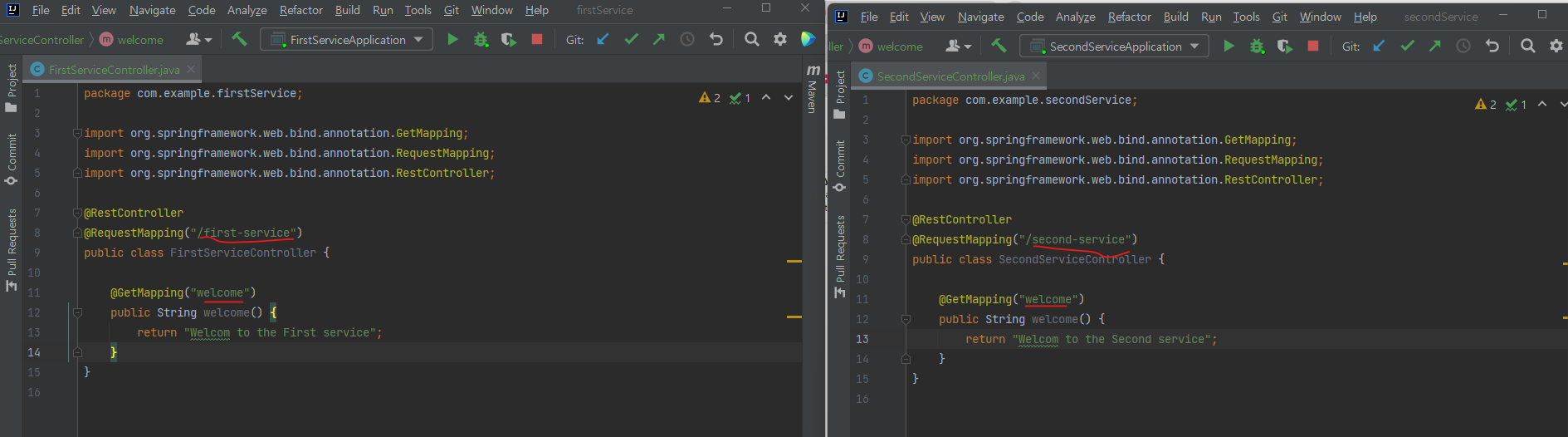
firstService 와 secondService 에 RESTFul 을 처리할 controller 를 추가하고 welcom() 메소드에
각각 first-service 와 second-service 로 URL을 mapping 함.
firstService 와 secondService 의 application.yml 파일에
port 지정 (8081,8082)
spring application name 지정
Eureka-server 에 등록 여부를 지정 한다
( 현재 이번 글에서는 Eureka Server 에 Eureka client 로 등록을안한다. 즉 Gateway에서 route 정보르 기반으로 바로 이동 한다
Eureka Server에서 등록된 service를 찾는 행위를 안함
)

apigateway-service 프로젝트 생성 후
application.yml 파일을 아래처럼 수정 한다.
server:
  port: 8000

eureka:
  client:
    register-with-eureka: false
    fetch-registry: false
    service-url:
      defaultZone: http://localhost:8761/eureka

spring:
  application:
    name: gateway-service

  cloud:
    gateway:
        routes:
          - id: first-service
            uri: http://localhost:8081/
            predicates:
              - Path=/first-service/**
          - id: second-service
            uri: http://localhost:8082/
            predicates:
              - Path=/second-service/**
apigateway-service 에 application.yml 에 routes 정보가 들어가는것은 이해 되는데
왜 eureka server url도 넣어야 하는가?
apigateway 는 discovery service (즉 eureka server에서 first-service와 second-service정보를 가져오지 않는데 말이다)
답: apigateway도 discovery service 와 통신을 해야함.
apigateway도 discovery service( eureak server = 전화번호부) 입장에서 보면 하나의 eureak client 이고
전화번호부 명부에 등록만 안되는것이다.
확인:
1) http://localhost:8081/first-service/welcome 접속시 직접 service 에 접속 되서 화면이 보이는것 확인함.
( gateway를 거치지 않은 상태, 각 개별 MSA 가 정상작동 하는지 TEST 용)

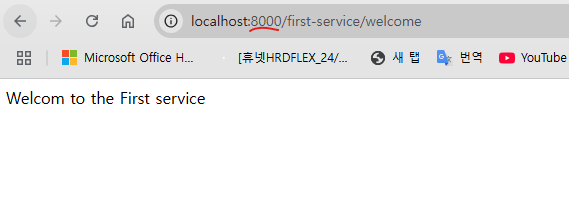
2) http://localhost:8000/first-serivce/welcom 접속시, 8000 port 로 접속 했음에도 불구하고 8081에 뜬
first-service 가 호출됨. (route 가 작동 한것임)
'SI 업무 > MSA관련' 카테고리의 다른 글
| 5. Gateway with (lb://) (2) | 2024.12.25 |
|---|---|
| 6. 1~5까지 학습 내용 정리 (1) | 2024.12.25 |
| (작성중)4. Gateway-filter (Custom filter, Global filter) (1) | 2024.12.25 |
| 2. Discovery Service ( netflix 의 Eureka) (1) | 2024.12.24 |
| 1. MSA 개념 (0) | 2024.12.24 |

