UserMapper.xml 에 getUserById 가 수행되면 결과가 resultType 에 정의된
dto 객체에 담긴다.
그리고 service 단에서 이걸 다시 response 로 UI (아직까지는 Postman) 에 넘겨 준다.
만약 UserMapper.xml 에 쿼리가 1000개면
1000개의 dto가 필요한 구조다.
난 안그렇치만 개발자중에는 정말 단순 반복을 극혐 하는 사람들이 있다.
이런 사람들에게 매번 쿼리가 틀리니 매번 dto를 만들어야 한다면 아마
퇴사 할거다.
그래서 그런가!! dto를 매번 안 만들어도 되는 방법이 있다.
실제 누군가가 만든 소스를 보고 흉내 낸것이다.
1. CustomResultMap.java 구현
package com.example.myproject.biz.com;

import org.apache.commons.collections4.map.ListOrderedMap;

import java.io.Serial;
import java.io.Serializable;

public class CustomResultMap extends ListOrderedMap<String, Object> implements Serializable {
    @Serial
    private static final long serialVersionUID = -3373848823544700461L;


    // put() 메소드 오버라이드
    @Override
    public Object put(String key, Object value) {
        // 기본 put() 동작을 유지하면서 추가적인 처리를 할 수 있습니다.
        // 예: 로그, 값 검증, 변환 등
        return super.put(key, value);
    }

    // 필요에 따라 추가적인 메소드들을 추가할 수 있습니다.
    public Object get(String key) {
        return super.get(key);
    }

    public String toString() {
        return super.toString();
    }
}
2. DTO를 사용 안하고 공통API 인 CustomResultMap을 사용할 sql를 추가 한다.
-Mapper interface 에 getAllUser 추가
-Mapper xml 에 getAllUser 추가
-Service 에도 추가
== UserMapper.xml 내용==
<?xml version="1.0" encoding="UTF-8" ?>
<!DOCTYPE mapper PUBLIC "//mybatis.org//DTD Mapper 3.0//EN" "http://mybatis.org/dtd/mybatis-3-mapper.dtd">
<mapper namespace="com.example.myproject.biz.mapper.UserMapper">

    <select id="getUserById" parameterType="int" resultType="com.example.myproject.biz.dto.User">
        SELECT id, name, email
        FROM users
        where id =#{id}
    </select>

    <select id="getAllUser" resultType="com.example.myproject.biz.com.CustomResultMap">
        SELECT id, name, email
        FROM users
    </select>

</mapper>
== UserMapper.java (mapper interface 추가) ==
package com.example.myproject.biz.mapper;


import com.example.myproject.biz.com.CustomResultMap;
import com.example.myproject.biz.dto.User;
import org.apache.ibatis.annotations.Mapper;
import org.apache.ibatis.annotations.Param;

import java.util.List;

@Mapper
public interface UserMapper {
    User getUserById(@Param("id") int id); // 매퍼 XML에 정의된 SQL과 매핑되는 메서드
    List<CustomResultMap> getAllUser();
}
==Service 에 추가된 내용==
package com.example.myproject.biz.service;

import com.example.myproject.biz.com.CustomResultMap;
import com.example.myproject.biz.dto.User;
import com.example.myproject.biz.mapper.UserMapper;
import com.example.myproject.biz.trace.MapperBeanChecker;
import org.springframework.beans.factory.annotation.Autowired;
import org.springframework.web.bind.annotation.GetMapping;
import org.springframework.web.bind.annotation.PathVariable;
import org.springframework.web.bind.annotation.RequestMapping;
import org.springframework.web.bind.annotation.RestController;

import java.util.List;


@RestController
@RequestMapping("/api") // API 기본 경로
public class MyService {

    @Autowired
    private UserMapper userMapper;

    @Autowired
    private MapperBeanChecker beanChecker;

    // ID로 사용자 정보 조회
    @GetMapping("/user/{id}")
    public User getUserById(@PathVariable("id") int id) {
        System.out.println("start..");

        beanChecker.check();

        return userMapper.getUserById(id); // MyBatis Mapper 직접 호출
    }

    // ID로 사용자 정보 조회
    @GetMapping("/user/all")
    public List<CustomResultMap> getAllUser() {
        System.out.println("start..");
        return userMapper.getAllUser();
    }
}
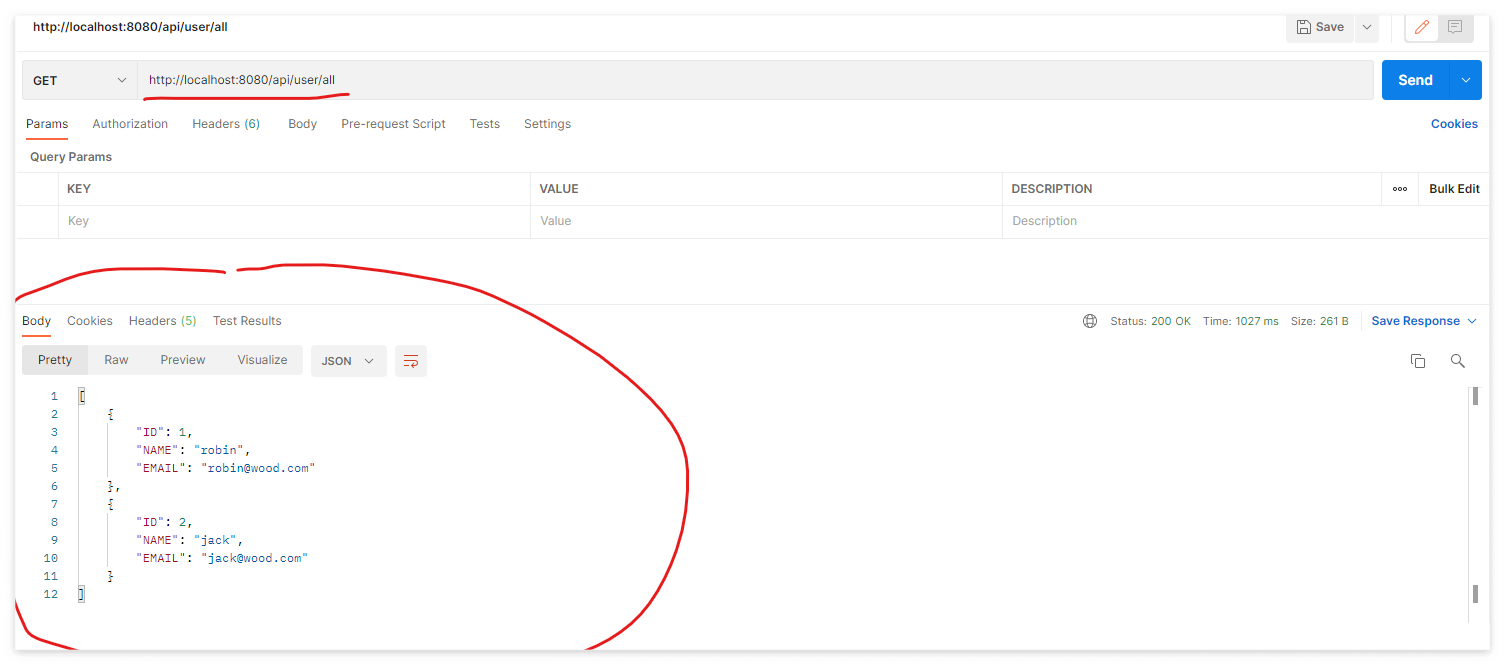
3. Postman 으로 요청을 쏘니 정상 작동 한다.
4. 여기부터 드는 궁금증.
이게 어떻게 가능 한거지?
=> MyBatis는 쿼리 결과를 **ResultSet**에서 가져온 후,
이를 매핑하여 DTO 또는 Map 객체로 변환 한다.
만약 resultType 에 Map 객체를 쓰겠다고
설정( resultType="com.example.myproject.biz.com.CustomResultMap">) 하면
ResultSet에서 가져온 컬럼 이름을 Map의 key로, 컬럼 값을 Map의 value로 설정한다..
즉, MyBatis는 ResultSet의 각 행을 Map<String, Object>에 매핑하는 것이다.
여기서 중요한 점은 Map 객체가 기본적으로 put() 메서드를 통해 데이터를 담기 때문에,
위의 CustomResultMap 의 put() 메소드를 override 하면
내가 원하는대로 key, value 를 담을수 변형해 담을수 있는 것이고 put() 메소드는
ResultSet 을 map 에 담는 작업을 하기 위해 mybatis api 가 put() 메소드를 호출 하는 것이다.
resultType 에 HashMap을 넣어도 작동 하는가?
=> 가능 하다.
<select id="selectData" resultType="java.util.HashMap">
이렇게 쓰는게 mybatis 공식 문서에 나와 있는가?
=> 이 방식은 MyBatis 공식 문서에 나와 있으며, 유연한 쿼리 결과 처리 방식으로 많이 사용된다.
오늘도 읽어주셔서 감사합니다.
'SI 업무 > 나만의 프로젝트 만들기' 카테고리의 다른 글
| 8. vue 화면 생성 하기 (with axios) (0) | 2024.12.02 |
|---|---|
| 7. clob 의 경우는 어떻게 CustomResultMap에 담지? (2) | 2024.11.30 |
| 5. RESTful 에러 잡기 2 (0) | 2024.11.25 |
| 5. RESTful 에러 잡기 1부 (0) | 2024.11.24 |
| 4. spring boot start with Postman (1) | 2024.11.23 |


